On March 24, 2026, everything changed.
OpenAI shut down OpenAI Sora-the same tool that exploded in popularity just months earlier.
No warning. No slow transition.
For creators and developers, this wasn’t just news-it was disruption. Workflows broke overnight, and anyone relying on Sora had to pivot fast.
But here’s the reality:
AI video didn’t slow down. It accelerated.
And if you move quickly, better tools are already waiting.
Best OpenAI Sora Alternatives (2026): Quick Answer
If OpenAI Sora is unavailable, the best AI video alternatives in 2026 are:
Each tool targets a different need-cinematic production, social content, or business videos.
What’s Really Happening With Sora?
OpenAI has not announced any shutdown of Sora.
But here’s the reality:
- Access is still limited and gated
- Safety and content policies are evolving
- Public rollout remains restricted
For creators, that’s enough to trigger a shift.
Because in content creation, waiting = losing.
Why You Should Never Depend on One AI Tool
Relying on a single AI platform is risky.
- Tools change fast
- Pricing changes faster
- Features break when you need them most
Professional creators already use multi-tool workflows.
Think of it like editing: you don’t rely on one app for everything. AI video works the same way.
8 Best AI Video Alternatives to Sora (2026)
1. Google Veo 3.1 — Best for Professional Realism
Google Veo is pushing the boundaries of realistic AI video.
Highlights:
- Strong scene understanding and motion consistency
- High-quality cinematic output
- Designed for ecosystem integration with platforms like YouTube
Best For:
High-end cinematic production and professional creators
Pricing:
- Limited free access
- Pro plans start around ~$19.99/month
- Advanced tiers can reach ~$200+ depending on usage
Verdict:
If realism is your priority, Veo leads the direction of the industry.
2. Runway Gen-4.5 — Best for Creative Control

Runway AI gives creators control that most tools lack.
Highlights:
- Motion control and scene editing tools
- Multi-layer editing
- Natural language video editing
Best For:
Filmmakers and creators who want precision
Pricing:
- Free plan (limited credits)
- Paid plans: ~$10 to $30/month
- Advanced tiers available
Verdict:
Runway is less about automation and more about direction.
3. Kling AI 3.0 — Best for Long-Form Content

Kling AI focuses on longer, structured video generation.
Highlights:
- Longer clip durations than most competitors
- Strong motion physics
- Efficient for content production
Best For:
Creators producing storytelling or batch content
Pricing:
- Starts around ~$10/month
Verdict:
If you need volume without sacrificing too much quality, Kling is practical.
4. HeyGen (Avatar IV) — Best for Business & Presenters

HeyGen solves a completely different problem.
Highlights:
- Realistic AI avatars
- 175+ languages
- High-quality voice sync
Best For:
Marketing, training, and explainer videos
Pricing:
- Free plan available
- Paid plans start at ~$29/month
Verdict:
If your content includes talking presenters, HeyGen beats cinematic tools.
5. Luma Dream Machine (Ray 3) — Best for Atmospheric Realism

Luma AI Dream Machine focuses on environmental realism.
Highlights:
- Strong lighting and physics simulation
- Smooth motion transitions
- Realistic scene generation
Best For:
Cinematic storytelling and visual scenes
Pricing:
- Free tier available
- Paid plans: ~$10–$30/month
Verdict:
Excellent for realism, but requires prompt refinement.
6. Alibaba Wan 2.6 — Best for Character Consistency

Alibaba’s Wan model addresses a major AI limitation.
Highlights:
- Maintains character identity across scenes
- Supports reference-based generation
- Ideal for storytelling
Best For:
Creators building narrative videos
Pricing:
- Not fully public (enterprise access)
Verdict:
Consistency is rare in AI video—Wan focuses directly on it.
7. Pika 2.5 — Best for Viral Social Content

Pika Labs focuses on speed and creativity.
Highlights:
- Fast generation
- Creative effects and stylized visuals
- Optimized for short-form content
Best For:
TikTok, Reels, Shorts
Pricing:
- Free plan
- Paid plans start around ~$10/month
Verdict:
Not the most realistic—but highly engaging.
8. Stable Video Diffusion — Best Open-Source Alternative
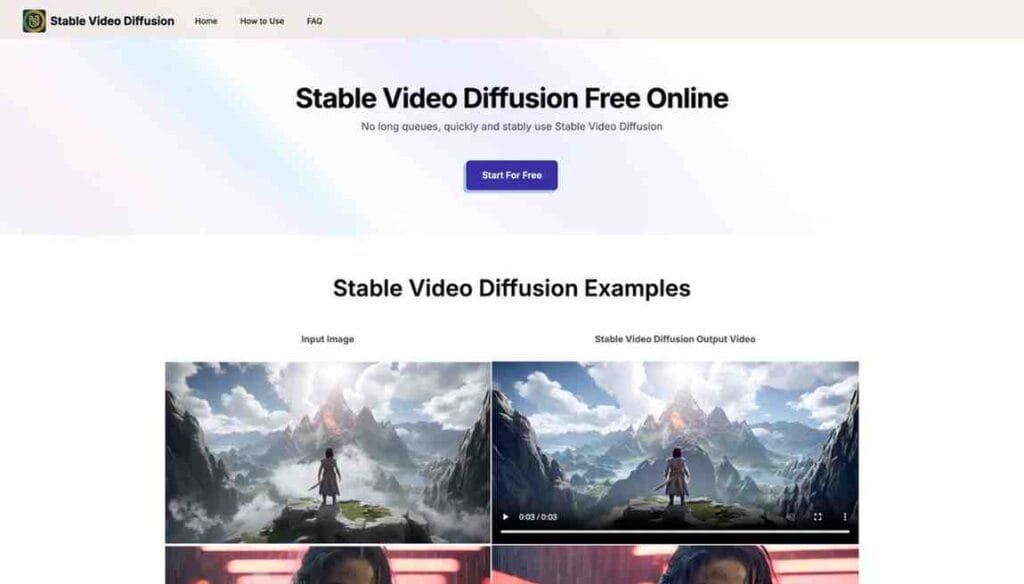
Stable Video Diffusion gives full control.
Highlights:
- Open-source flexibility
- Custom workflows
- No platform lock-in
Best For:
Developers and advanced users
Pricing:
- Free (compute costs may apply)
Verdict:
Maximum control—but requires technical knowledge.
Best AI Video Generators Compared (2026): Quality, Features & Ease of Use
| Tool | Best For | Ease of Use | Output Quality |
|---|---|---|---|
| Google Veo | Realism | Medium | High |
| Runway | Control | Medium | High |
| Kling | Long videos | Easy | Medium |
| HeyGen | Business videos | Easy | High |
| Luma AI | Cinematic scenes | Medium | High |
| Wan | Storytelling | Medium | High |
| Pika | Social content | Easy | Medium |
| Stable Video Diffusion | Developers | Hard | High |
How to Choose the Right Tool
Choosing the right AI video tool depends on your goal.
- YouTube videos → Runway or Luma
- Short-form content → Pika
- Business content → HeyGen
- High realism → Veo
Always define your goal first. Then pick the tool.
Pro Tips for Better AI Videos
Even the best AI tools fail with weak prompts.
Use this structure:
Subject + Action + Environment + Camera Style
Example:
“A delivery rider navigating a crowded city at sunset, cinematic lighting, wide-angle shot”
Keep prompts clear. Test multiple variations. Iterate.
Comparison: Sora vs the Top 5 AI Video Alternatives (2026)
Choosing an AI video tool in 2026 is no longer about “which is best.”
It’s about which tool fits your workflow.
Below is a real-world comparison between OpenAI Sora and the top competitors dominating the market right now.
Product Comparison Table
| Feature / Tool | OpenAI Sora | Google Veo | Runway AI | Kling AI | Luma AI Dream Machine |
|---|---|---|---|---|---|
| Core Strength | Cinematic storytelling | Realism + audio | Creative control | Long-form + budget | Environmental realism |
| Video Quality | Very high (film-like) | Very high (4K capable) | High (consistent motion) | Medium–High | High |
| Audio Generation | Yes (native) | Yes (native, advanced sync) | No (add manually) | Limited | No |
| Max Resolution | ~1080p–2K | Native 4K output | 1080p | 1080p | 1080p |
| Prompt Accuracy | Excellent | Excellent (especially audio + motion) | Very strong | Good | Strong |
| Clip Duration | Short clips | Medium | Medium | Longer clips supported | Short–medium |
| Editing Control | Limited | Moderate | Advanced (director-level tools) | Basic | Moderate |
| Ease of Use | Medium | Medium | Medium | Easy | Medium |
| Pricing | ~$20/month | ~$20/month+ | ~$12–$30/month | ~$5–$15/month | ~$10–$30/month |
| Availability (2026) | Discontinued/limited | Limited rollout | Public | Public | Public |
Key Insights (What Actually Matters)
1. Sora vs Veo → Audio + Realism Battle
- Sora focused on cinematic visuals
- Veo adds native audio + 4K output in one generation
👉 Result: Veo is more practical for real production workflows.
2. Sora vs Runway → Control vs Automation
- Sora = generate and hope
- Runway = generate + control + refine
👉 Result: Runway wins for professionals who need precision.
3. Sora vs Kling → Quality vs Scalability
- Sora = higher realism
- Kling = cheaper + longer videos
👉 Result: Kling wins for volume content (social media, bulk creation).
4. Sora vs Luma → Atmosphere vs Consistency
- Sora = better narrative realism
- Luma = stronger environmental physics (lighting, fog, motion)
👉 Result: Luma is better for visual storytelling scenes.
The Reality After Sora (Critical Insight)
Recent industry reports confirm that Sora has been discontinued due to high costs and strategic shift .
This changed the market completely.
Now the space is divided into:
- Google Veo → realism + audio + ecosystem
- Runway → control + filmmaking tools
- Kling → affordable, scalable content
- Luma → cinematic environments
How to Migrate from Sora to an Alternative ?
| Step | Action |
|---|---|
| Choose Model | Pick best fit like Google Veo (realism) or Runway AI (control) |
| Update API | Replace Sora model path with new model (same REST format) |
| Adjust Prompts | Simplify or tweak prompts based on model behavior |
| Test Output | Run multiple variations and compare results |
| Optimize Workflow | Combine tools for better results |
| Scale Usage | Lock best model and automate pipeline |
Key Advantage
- No new account
- No SDK changes
- Same API structure
👉 Just change the model path and continue.
Why Your AI Videos Look Bad (2026): 3 Mistakes You Must Avoid for Better Results
Even the best AI video tools fail when used incorrectly. Avoid these common mistakes if you want consistent, high-quality results.
1. Using Vague Prompts
Many users write prompts like:
“Create a cool video of a city.”
That won’t work.
AI models need clarity. Always define:
- Subject
- Action
- Environment
- Camera style
Better prompt:
“A delivery rider navigating a busy city at sunset, cinematic lighting, wide-angle shot”
👉 Clear input = predictable output.
2. Expecting Perfect Long Videos
AI video tools still struggle with:
- Long sequences
- Consistent motion
- Scene continuity
If you expect a 2-minute perfect cinematic clip in one go, you’ll get disappointed.
What works instead:
- Generate short clips (5–10 seconds)
- Combine them during editing
👉 Professionals build videos in parts, not in one prompt.
3. Relying on One Tool
This is the biggest mistake.
No single tool can handle:
- Realism
- Editing
- Effects
- Voice
- Consistency
Smart workflow in 2026:
- Generate → Runway AI or Google Veo
- Enhance → Pika Labs
- Present → HeyGen
👉 Multi-tool workflow = better results + future-proof strategy.
Future of AI Video (2026–2027): What’s Coming Next
| Trend | What It Means |
|---|---|
| AI + Audio Generation | Tools like Google Veo will create video + voice + sound in one prompt |
| Multi-Tool Workflows | Creators will combine Runway AI + Pika Labs + HeyGen for better output |
| Real-Time Video | Generation will become instant—like typing text |
| Hyper-Realism | Tools like Luma AI Dream Machine will rival real footage |
| Personalization | AI will generate custom videos for each user at scale |
Final Insight
👉 AI video is shifting from tool → system → ecosystem
Creators who adapt early will dominate the next wave.
My Experience & Review after using 1 Year
After testing these AI video tools, I found them impressively fast and creative—but not perfect. Short videos, ads, and social content look amazing with minimal effort. However, longer videos still struggle with consistency. The real game-changer is prompt quality—the better your input, the better the output. Some tools feel cinematic, others are built for speed. Overall, they’re powerful assistants for creators, but still need human direction for the best results.
Final Verdict
The “Sora shutdown” narrative is misleading.
But the lesson is real:
Never depend on one tool.
The smartest creators in 2026 use:
- Veo for realism
- Runway for control
- Pika for speed
- HeyGen for human videos
That combination builds a stable, scalable workflow.
FAQ
Is OpenAI Sora shutting down?
No official shutdown has been announced. Access is still limited.
Which AI video tool is closest to Sora?
Google Veo, Runway, and Luma AI currently offer the closest results.
What is the best free AI video tool?
Stable Video Diffusion is free but requires technical setup.
Can AI fully replace video editors?
No. AI speeds up production, but human creativity still matters.
Does Sora have a competitor?
Yes, OpenAI Sora has several strong competitors in 2026. Popular AI video generators include Runway, Pika Labs, Synthesia, Kaiber, and Stable Video Diffusion. These tools offer similar capabilities like text-to-video generation, AI editing, and cinematic outputs, making them viable alternatives depending on your use case.
What is the open source alternative to Sora?
The most notable open-source alternative to Sora is Stable Video Diffusion by Stability AI. It allows developers and creators to generate videos from images or prompts with more control and customization. Other emerging open-source tools are also gaining traction, especially in research and experimental AI video workflows.
Is Sora better than DALL·E?
No, Sora and DALL·E serve different purposes. Sora is designed for generating videos from text prompts, while DALL·E focuses on creating images. Sora handles motion, scenes, and storytelling, whereas DALL·E excels in static image generation. So, one is not better than the other—they are built for different tasks.
What is the Chinese alternative to Sora AI?
China has rapidly developed its own AI video tools, with platforms like Kling AI and other domestic models emerging as alternatives to Sora. These tools are optimized for local ecosystems and often integrate with Chinese platforms, offering competitive video generation capabilities.
Sources & Credibility
- Official documentation from OpenAI
- Product pages from Runway AI and Pika Labs
- Public product insights from HeyGen and Luma AI Dream Machine
All tools listed are active and widely used as of 2026.
Read More: